Job costing software for project-based contractors
Break the work into phases, publish a budget baseline, and watch actual cost climb against plan while the project is still open — so you catch overruns before they eat the job, and bill progress on real numbers.
A multi-phase project, watched in real time
You win a build-out and set it up as a project — phases for demolition, rough-in and finishes, each with a planned budget. When the numbers are right, you publish a baseline: a frozen, versioned snapshot the live plan can't quietly overwrite.
Then the work starts. Crews log time, materials go on, and supplier invoices get allocated to the work orders and tasks they belong to — feeding each phase's actual cost automatically. No month-end spreadsheet reconciliation to find out where you landed.
The project cost tab shows planned budget, earned value, actual cost and forecast side by side — with variance %, and the EVM indices (BAC, CPI, SPI, EAC) per phase and for the whole project. The week finishes start running hot, you see it and act — and you bill progress on real numbers, so margin is never a surprise.
See how it works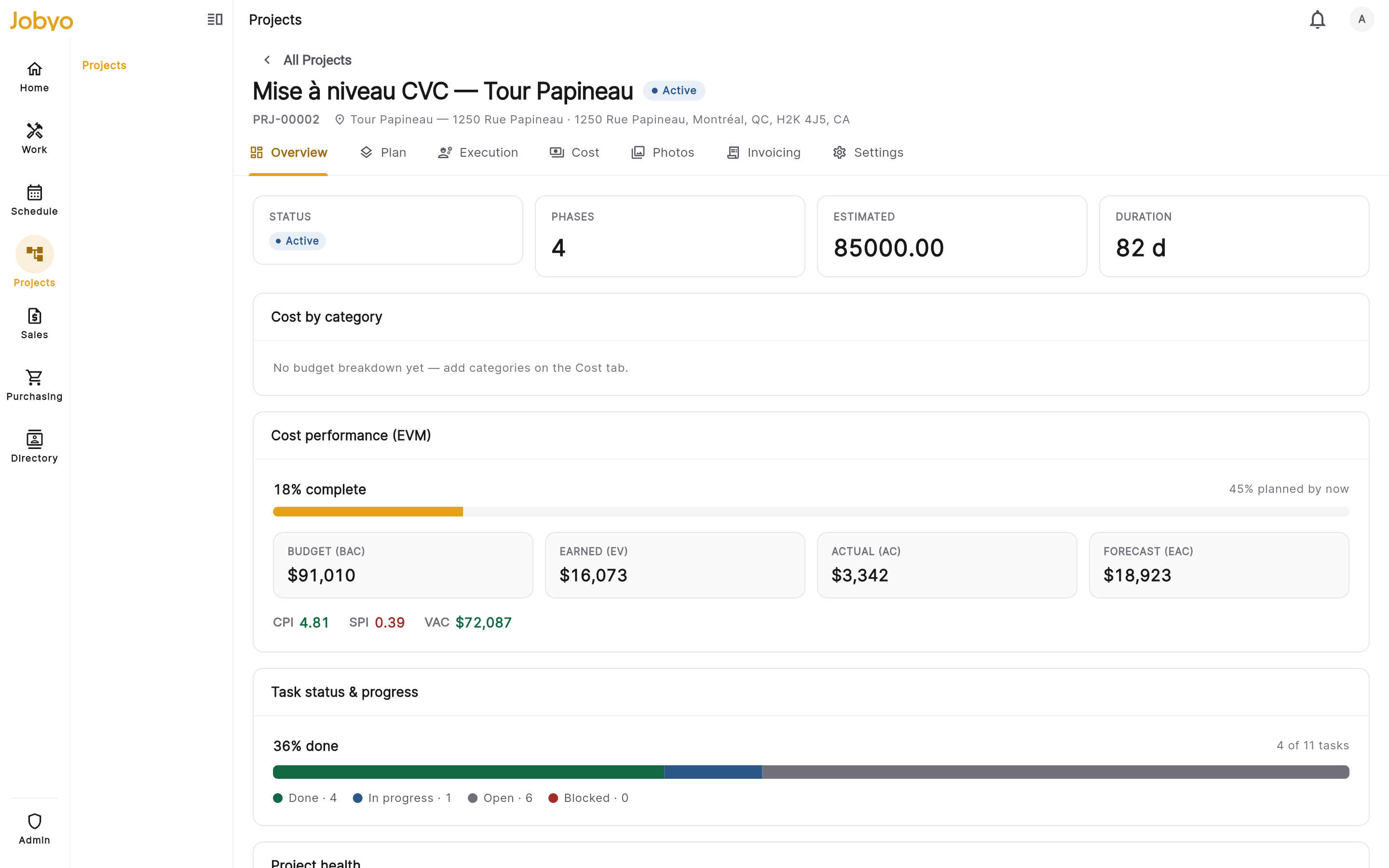
How Jobyo helps project-based contractors
Planned vs. actual, live
Every phase and the whole project show planned budget, actual cost, variance and variance % — with the EVM panel (BAC, CPI, SPI, EAC) — updated the instant the field logs work.
See live job costingFrozen, versioned baselines
Publish a baseline and the plan is snapshotted and locked; project, phase and task anchors are immutable, so scope changes show up against the original plan.
See job costingPurchase allocations to jobs
Supplier invoices allocate to the work order, task or project where the work happened, so material and purchased cost rolls up to the right phase.
See cost distributionBill progress on real numbers
Bill the whole project or a single completed phase (progress billing), with the real cost behind every claim and tax captured at send.
See invoicingWhat changes
- Catch a phase running over while you can still act
- Bill progress on real cost, not estimates
- See scope changes against a frozen baseline
- Track BAC, CPI, SPI and EAC per phase
- Protect margin on the projects that matter most
Where it fits in Jobyo
Project-based contractors · FAQ
Yes — the project cost tab shows planned budget, actual cost, variance and variance % with an EVM panel (BAC, CPI, SPI, EAC), per phase and for the whole project, updated in real time. (Planned-vs-actual is on the Pro plan and up.)
Yes — when the plan is right you publish a baseline: a versioned snapshot the live plan can't overwrite. Project, phase and task anchors are immutable, so changes show up against the original plan.
Yes — purchase invoices are allocated to the work order, task or project where the work happened, so material and purchased cost rolls up to the right phase.
Yes — bill the whole project or a single completed phase (progress billing), with a pre-bill summary of what’s unbilled and billed-to-date, and the real cost behind every claim.
Yes — projects, phases, live job costing and procurement scale to multi-role teams. The Pro plan adds job costing and advanced reporting; Business adds full procure-to-pay (purchase orders and goods receipts).
HVAC & refrigeration
From emergency service calls to seasonal maintenance agreements and equipment installs, Jobyo runs the whole job on one system — schedules it, captures it in the field, and shows what each call actually costs as the work happens.
See how it worksPlumbing & electrical
Dispatch the right tech, capture exactly what happened on site, and turn the visit into an accurate invoice the same day — with the real cost behind every line and the payment recorded and allocated.
See how it worksFacilities & property maintenance
Recurring work across many sites and assets — scheduled, executed in the field, and costed as it happens, so you can see what a property actually costs to service and price renewals on real numbers.
See how it worksEquipment & appliance service
Identify every unit by its scannable asset tag, schedule the callout, and keep the parts and labour on the work order — so you know what each service actually costs before you invoice.
See how it worksSpecialty & multi-trade
Mixed crews and mixed scopes on one connected system — scheduling, work orders, costing and billing that actually talk to each other, so nothing lives in a separate tool.
See how it worksSee it on your own jobs.
Start free, bring your crew on, and watch every job's actual cost against plan from day one.